
ADDED A MOBILE DRIVER DASHBOARD
We added a Driver Dashboard to the iOn mobile experience, giving customers access to driver performance and safety information directly from their mobile device. The dashboard includes dedicated views for driver events and safety scores, along with filtering options that respond to account changes and selected assets.
Customers can view driver event trends, safety score summaries, score breakdowns, and historical performance data without needing to switch to a desktop. The dashboard is optimized for mobile devices and adapts to different screen sizes for improved usability.
ADDED SPEEDING CATEGORY IN DRIVER SCORING
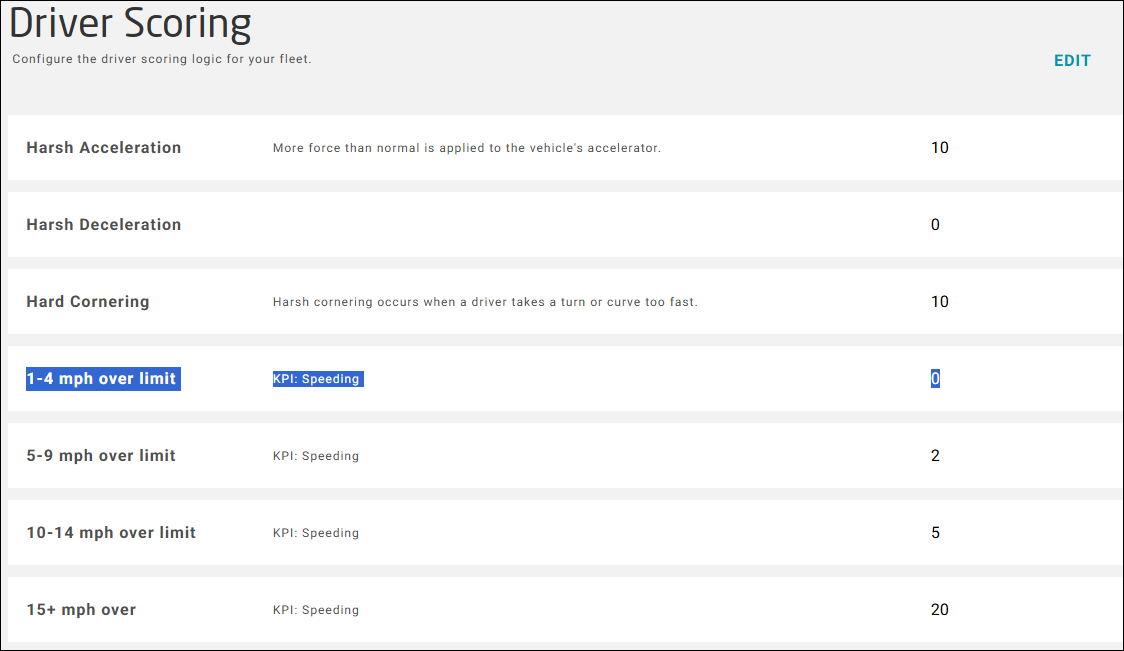
We added a new speeding category for events that occur between 1 and 4 mph over the posted speed limit, providing a more detailed view of driver behavior and allowing better differentiation between minor speeding events and more significant violations.
EXPANDED THE TRIP LIST
We expanded the Trip List grid to include additional information that helps customers identify trips more quickly and reduces the need to navigate between screens. New columns provide visibility into Account (Group), Asset, Device, Identifier (ESN, IMEI, or Serial Number), and Vehicle Registration information directly from the Trip List.
MADE DRIVER ASSIGNMENTS EASIER TO MANAGE
We improved the asset import process to make driver assignment management more efficient. Customers can now remove an existing driver assignment through the import process by specifying a blank value or selecting None in their asset file, eliminating the need for manual updates after an import.