
MADE THE TRACKING SCREEN’S STATE FILTER MORE USER-FRIENDLY
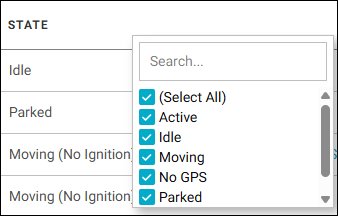
In the Tracking screen’s grid, we changed the filter for the State column from an Equals match (which required you to type in the asset status) to a check box list that preselects all the states. You just need to deselect the ones you don’t want returned (or uncheck Select All and then select the status types to show).
IMPROVED THE BETA REPORTS SCHEDULER
We improved the beta version of the reports scheduler as follows:
- Viewing scheduled reports for subgroups: We added a View Subgroups toggle at the top of the Scheduled Reports tab, which, when enabled, will show all the reports that have been scheduled for the subgroups of the group you have selected in the Group Chooser, as well as the parent group itself.
- Improved the time implementation: You can now specify the time zone to use. (Previously, it would run only in PST.) In addition, we changed the default for the Start Time option to midnight on the start day, so that the whole day’s results will be included. (The previous default was the time of day the user created the schedule.)
LIMITED BETA GROUP
This feature is available for just a few customers who have agreed to test it out while it is still in beta. Most iOn users will NOT see the new reports scheduler.