
REQUIRING A MININUM OF 12 CHARACTERS FOR PASSWORDS
In release 3.57, we’d planned to update our password restrictions to require you to have a minimum of 12 characters. We backed off that change to give customers more warning, but we are now implementing this new requirement.
You won’t have to immediately change your password if it’s shorter; this will apply to new users and current users when they update or reset their passwords. (The maximum remains 64 characters.)
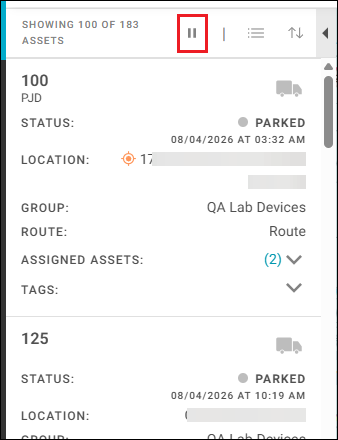
PAUSING LIVE UPDATES ON THE TRACKING SCREEN
Normally, the Tracking screen updates asset data in the Asset list and on the map every 12 seconds. We have added another method to prevent that automatic refresh: a Pause Live Updates icon in the options at the top the Asset list. (You can click the Play button to resume having the data reloaded at its usual interval.)
IMPROVED THE PERFORMANCE FOR MAPPING ASSET HISTORY
We changed how mapping asset history is handled on the back end to improve performance.
ADDED A DRIVER SCORE CARD REPORT WITHOUT VIDEO LINKS
For Vision customers with roles that can’t view their videos, we added a Driver Score Card Summary v2 (No Video Footage) report. The data is the same as the regular Driver Score Card Summary v2 report but doesn’t include links to view video captures. iOn administrators can enable this for a user role (and disable the original report) in the Add/Edit Role dialog box (in the Analytics & Reports section under Reports >> Common >> Driver Activity & Safety).