
IMPROVED ASSET MOVEMENT ON THE TRACKING BETA SCREEN
On the Tracking Beta screen, when you are tracking asset activity live, you will see that the asset icons now move at real-life speed on the map rather than jump from one location to another.
ADDED NEW REPORTS
We added two new reports:
- Decommissioned Asset Summary: Provides data about assets that have been moved to decommissioned groups, including the asset name, decommissioned date, current group, previous groups, and ESN of the associated LMU. This report is in the Asset Activity category.
- Device Check-in Summary: Provides data on device check-ins, including the number over the course of the time range, the last reported time, and the last reported address. It also lists devices that haven’t reported in the last seven days and assets without an associated device. You can find this report in the Exception Management category.
INCREASED THE DIRECTIONAL MARKER SIZE FOR LIVE HISTORY WHEN ZOOMING IN
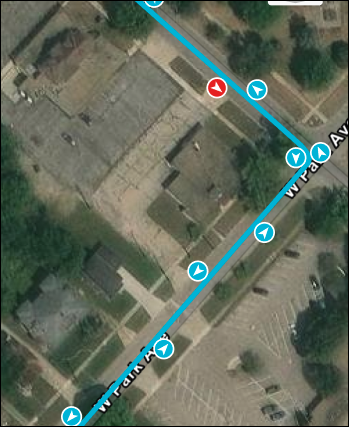
In the Live History widget, the directional arrows on the event markers now increase in size as you zoom in so that you can more clearly view which direction the assets were traveling along the trip path lines.
SHOWING THE TRAVEL DIRECTION FOR ASSET HISTORY MORE CLEARLY
When you map asset history, you will now see that the directional arrows are offset along the trip path lines when you zoom in (to the right from the driver’s view). This will make it easier to see where the asset has traveled, especially if they drove both directions on a road.
HIDING UNAVAILABLE ROLES
On the Admin - Roles screen, we removed the roles that aren’t usable by users from view, such as the CalAmp-only roles.